
It’s a special kind of frustration when you realize WordPress is not sending emails. Password resets, contact form submissions, and welcome messages for new users just seem to disappear into thin air. It leaves you and your visitors completely in the dark, but please don't worry—this is an incredibly common and entirely fixable problem.
This guide will walk you through, step-by-step, why this happens and how to set up a reliable solution that gets your website’s emails delivered every single time.
Why Your WordPress Emails Aren't Being Delivered

If you're pulling your hair out over this, trust me, you're in good company. The problem usually isn't a mistake you've made. It's rooted in how WordPress sends email straight out of the box.
By default, WordPress uses a basic PHP mail function called wp_mail(). You can think of it like a postman who doesn’t carry any official ID. When he shows up at the email sorting office (like Gmail or Outlook), nobody trusts him, and your message gets turned away.
Most web hosts don't configure this function for reliable email sending. Even when they do, the big email services have become incredibly aggressive with their spam filters. They see an email coming from a web server without proper authentication and, more often than not, they’ll either block it outright or dump it straight into the junk folder.
The Role of Your Hosting Environment
It's helpful to remember that your website’s hosting server is built to serve web pages, not to be a dedicated email server. That’s a crucial distinction.
Sometimes, the server's IP address might even get blacklisted because of what another website on the same shared server is doing. That instantly torpedoes your email deliverability. This can be a real headache, especially if you've recently gone through the process of moving your WordPress site to new hosting only to find your emails have suddenly stopped working.
This isn't just a minor glitch; it's a fundamental reliability issue. Your website needs to communicate with users for e-commerce transactions, user registrations, and security alerts. When that communication breaks down, so do trust and functionality.
Widespread Impact on UK Businesses
This isn't some obscure technical issue; it affects a massive number of websites. WordPress powers an incredible 43.6% of all websites globally, meaning countless UK businesses rely on it for day-to-day operations where email simply has to work. The default setup, with its PHP mail limitations, often lets them down.
Now that we understand the root causes, let's dive into the practical, actionable solutions that will get your emails flowing again.
So, Why Aren't Your WordPress Emails Sending?
To get to the bottom of why WordPress isn't sending emails, we first need to understand what's happening under the bonnet. It's usually not just one thing, but a few different issues conspiring against you.
The main problem almost always comes down to how WordPress tries to send email by default. It uses a basic PHP function called mail(), which is notoriously unreliable. Why? Because it sends emails without any real authentication. Think of it like posting a letter with no return address – to modern email providers like Gmail or Outlook, it just screams "suspicious."
The Spam Filter Problem
This leads us straight to the next hurdle: aggressive spam filters. When an email pops up from a web server without the right credentials, it immediately raises a red flag. The receiving server has to ask itself, "Is this genuine, or is it just more junk?" Without proof, it'll play it safe and either dump your message in the spam folder or block it outright.
This is a massive issue for site owners across the UK. In fact, some studies have shown that roughly 16.9% of all transactional emails in the UK never make it to the inbox. Around 10.5% end up in spam, and another 6.4% get blocked completely. If you want to dive deeper, you can discover more insights about these email deliverability statistics and see just how widespread the problem is.
When Your Host or Plugins Get in the Way
Your web host’s server setup can also be part of the problem. If you're on a shared server, for example, you're at the mercy of your neighbours. One dodgy website sending out spam could get the entire server's IP address blocklisted. Suddenly, your e-commerce store is losing sales because your host is seen as untrustworthy.
And sometimes, the problem is closer to home. A poorly coded plugin or even a setting in your theme can clash with that default mail() function, stopping emails before they even have a chance to leave your site. These conflicts can be a real pain to track down and can sometimes trigger other problems, which is why it's always handy to know how to fix a 500 internal server error, as the two can occasionally be linked.
The reality is, the standard WordPress email system just wasn't built for today's security-focused internet. It’s a setup that’s too easily flagged as spam, which leads to missed notifications, lost leads, and unhappy customers.
Getting a handle on these core issues is the first real step. Once you know why your emails are failing, you can put the right tools in place to build a reliable, professional email system for your website and put these headaches behind you for good.
If you've tried everything else and are still tearing your hair out over emails going missing, it's time for the real fix: setting up an SMTP plugin. This is the single most reliable way to solve WordPress email problems for good, and honestly, it’s what the pros do. It might sound a bit technical, but I promise it’s more straightforward than it seems.
Let’s put it this way. By default, WordPress tries to send emails using a function that's a bit like handing a letter to a stranger on the street and hoping it gets to its destination. An SMTP plugin, however, reroutes your website’s emails through a proper, trusted postal service like Royal Mail or DPD. It gets your emails authenticated, tracked, and actually delivered.
Choosing Your SMTP Plugin
First things first, you need to pick a plugin to do the heavy lifting. The WordPress repository has some great options, but my go-to recommendation is almost always WP Mail SMTP. It’s incredibly popular for good reason—the setup is a breeze, it works with all the major email services, and the free version has more than enough power for most websites.
After installing and activating the plugin, you’ll spot its settings page in your WordPress dashboard. This is where the magic happens and where you'll connect your site to a proper email sending service.
To give you a clearer picture, here’s a simple diagram showing how the Simple Mail Transfer Protocol (SMTP) actually works. This is the system that these plugins use to get your emails sent correctly.
As you can see, SMTP is the standard protocol for moving emails from a client to a server and between different servers. It’s the industry-wide method for reliable communication, which is why we’re tapping into it.
Why a Transactional Email Service is Non-Negotiable
An SMTP plugin is just the vehicle; it needs a powerful engine. That engine is a dedicated transactional email provider. These services are custom-built for sending application-generated emails—things like password resets, new user notifications, and contact form submissions.
Now, you might be tempted to just plug in your personal Gmail or Outlook account details. Please, don't do this. It’s a common mistake that leads to a whole new set of headaches.
- You'll hit sending limits fast: Personal email accounts are designed for humans, not for automated websites. They have low daily sending caps, and once you hit them, your account can get locked.
- Your emails will still look spammy: Emails sent from personal accounts often fail the strict authentication checks that services like Gmail and Outlook use, meaning they’re likely to end up in the junk folder anyway.
- It’s a security risk: Putting your personal email login details into a website plugin is never a great idea.
Instead, we're going to use a professional service. These providers are designed to authenticate your emails properly, which builds trust with receiving email servers and massively boosts your deliverability rates.
The Configuration Process
Once you’re inside your SMTP plugin’s settings, you'll be asked to choose a "mailer." This is simply the email sending service you want to use. The plugin will then prompt you for a few details from that service, which is usually just an API Key.
The key takeaway here is that you're completely bypassing your web host's unreliable email server. You are instead authorising a professional, third-party service to send emails on your website's behalf. That's the secret to getting past spam filters.
After you've entered the details, the plugin will have an option to send a test email. This is the final, crucial step to confirm that everything is connected and working as it should. When that test email lands in your inbox, you’ll know your WordPress email problems are officially a thing of the past. Your contact form submissions will be reliable, your customers will get their order confirmations, and you can finally get some peace of mind.
Choosing the Right Email Sending Service
Once you've got an SMTP plugin installed, you’ve essentially built a powerful engine for your website's emails. But like any high-performance engine, it needs the right kind of fuel to run properly. That fuel is a dedicated email sending service, often called a transactional email provider.
This decision is more crucial than you might realise. It has a direct impact on your email deliverability, the number of emails you can send, and your overall costs. It’s a bit like picking a courier for your business – you need a service with a rock-solid reputation for getting every parcel delivered on time, without fail.
Why You Can't Just Use Your Hosting Email
I see this all the time. Web hosts often throw in free email accounts with their plans, and it’s tempting to try and use one of those. The problem is, an address like info@yourdomain.com is designed for human-to-human conversation, not for firing off automated emails from a website. They come with very strict sending limits and simply don't have the specialised infrastructure to ensure your password resets or contact form submissions actually land in someone's inbox.
A dedicated provider, on the other hand, lives and breathes email delivery. Their entire business model is built around maintaining a flawless sending reputation so that email giants like Gmail and Outlook trust every single message that comes from their servers.
This infographic lays out the difference a professional setup can make in stark terms.
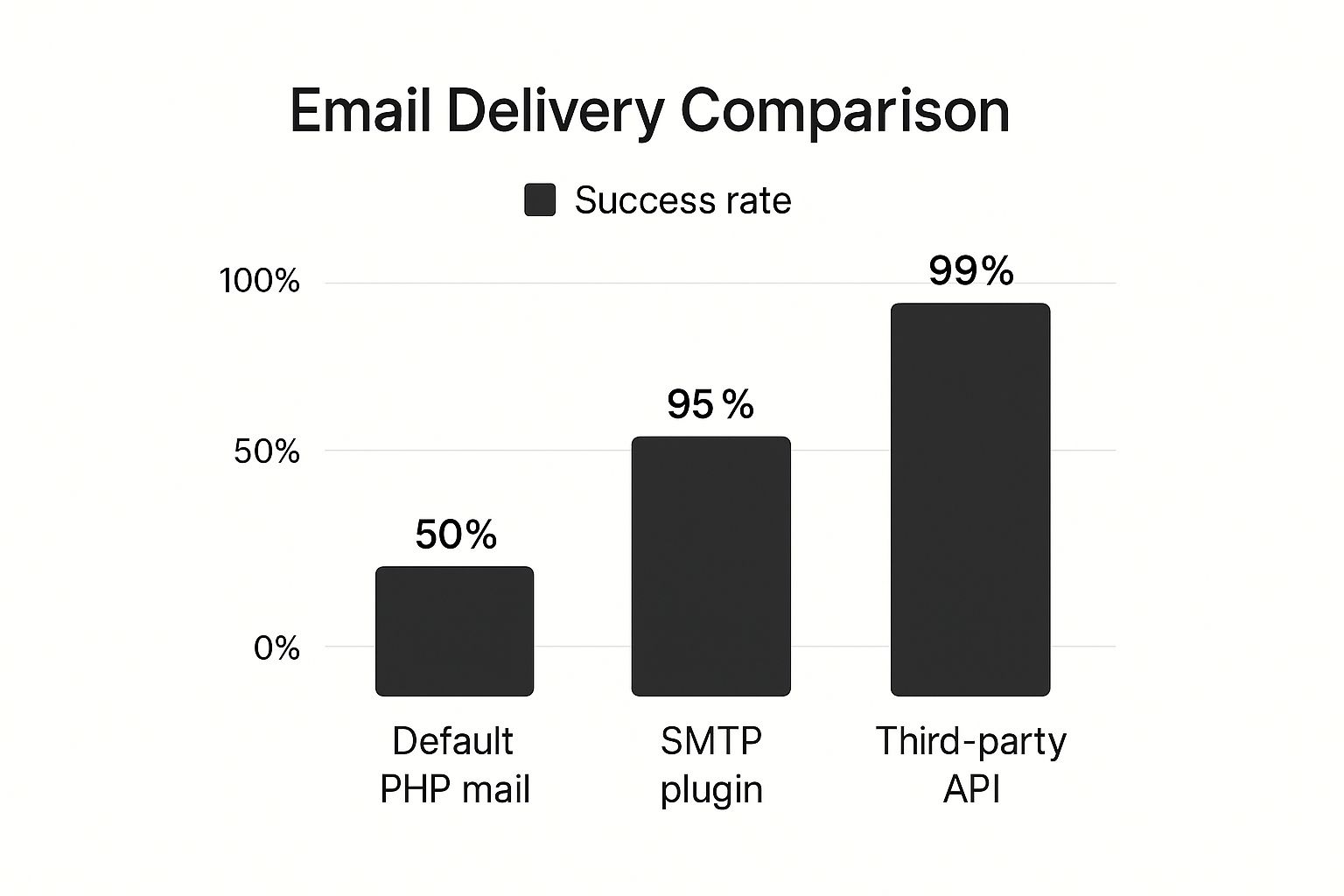
The numbers really speak for themselves. Making the switch from WordPress's default mail function to a proper SMTP service massively boosts the chances of your emails reaching their destination.
Top Providers for WordPress Sites
So, when your WordPress site isn't sending emails, which service should you turn to? Thankfully, several fantastic providers offer the perfect solution. They all integrate smoothly with popular plugins like WP Mail SMTP and most have generous free plans to get you up and running without spending a penny.
Here are a few of the most popular and reliable choices I regularly recommend:
- SendGrid: A massive name in the email world, SendGrid is known for its incredible deliverability and powerful analytics. Its free plan is often more than enough for small businesses and new websites to get started.
- Mailgun: Originally built with developers in mind, Mailgun is now easy enough for anyone to use and is phenomenally reliable. It offers flexible pricing and detailed logs, so you can track the journey of every email you send.
- Amazon SES (Simple Email Service): If you anticipate sending a high volume of emails, Amazon SES is unbelievably cost-effective. The setup can be a little more technical than the others, but its pay-as-you-go model is perfect for scaling up.
The best service for you really depends on your specific needs. A small blog sending a few dozen notifications a week has very different requirements from a bustling e-commerce store sending thousands of order confirmations every day.
To help you decide, let's look at them side-by-side.
Comparing Popular Transactional Email Providers
Choosing between the top email sending services can be tricky, as they all have unique strengths. This table breaks down the key details to help you find the best fit for your WordPress site's specific needs, from small blogs to large-scale operations.
| Provider | Best For | Free Tier Details | Key Strengths |
|---|---|---|---|
| SendGrid | Beginners & Small Businesses | 100 emails/day, forever | User-friendly setup, great analytics |
| Mailgun | Developers & Growing Sites | 5,000 free emails/month for 3 months | High deliverability, flexible API |
| Amazon SES | High-Volume Senders | 62,000 free emails/month (if sent from an EC2 server) | Extremely low cost at scale |
Ultimately, choosing any of these professional services is a massive upgrade from the default WordPress mail function. You’ll immediately gain reliability, detailed tracking, and the peace of mind that comes from knowing your important messages are actually being delivered.
If you’re still not sure which path is right for your website, our team is always here to help. Contact us to learn more about how we can get your website’s emails working flawlessly.
2. Testing and Verifying Your New Email Setup

Alright, you've put in the legwork to install your SMTP plugin and hook it up to a proper email service. Now for the moment of truth: making sure it all actually works. This isn't a step you want to skip; it’s your chance to spot any little issues before your customers do.
Most good SMTP plugins—like WP Mail SMTP, for example—have a built-in email testing tool. You’ll usually spot it somewhere in the plugin's main settings area. The process is dead simple: just pop in an email address (I’d recommend using one of your own for this) and click the ‘Send Test’ button.
What a Successful Test Looks Like
If all has gone to plan, you should get an instant success message right there in your WordPress dashboard. But the real confirmation comes when that test email lands squarely in your inbox. Check your spam folder too—if it’s not in there, you’ve nailed it.
This is the green light you’re looking for. It confirms your WordPress site is now correctly passing emails to your sending service, which in turn is authenticating them and getting them delivered. It’s a simple check that brings a whole lot of peace of mind.
What to Do If the Test Fails
Don't sweat it if you get an error or the email goes missing. A failed test is actually a good thing—it gives you a clear pointer to what’s wrong, which is almost always a minor configuration error. It’s far better to find this out now than when a customer rings up to say they never received their order confirmation.
From my experience, a failed test usually comes down to one of these common culprits:
- Dodgy API Key or Credentials: One wrong character in an API key or password is all it takes to break the connection. Go back to your email provider, copy the credentials again, and paste them in carefully.
- Wrong Sending Domain: The domain you’ve set up in your email service has to be an exact match for your website’s domain. No typos, no ‘www’ if it shouldn’t be there.
- Incomplete Domain Verification: To send emails on your behalf, services like SendGrid or Mailgun need you to add special DNS records to prove you own the domain. Double-check that you’ve completed this step and given it a little time to propagate.
This testing phase is non-negotiable. Think of it as the final quality check that turns your site's email from a frustrating liability into a reliable tool for essential communication.
Getting this right is more important than ever. The whole email world is constantly shifting, especially in the UK, where tougher privacy regulations and smarter spam filters are always raising the bar. This directly affects whether your website’s emails get delivered, which is why a proper setup is so vital. You can read more about the evolving state of email marketing to get a better sense of why this is so critical.
If you’ve tried everything and are still hitting a wall, don’t hesitate to reach out. Our team has seen it all and we're here to help. Contact us to learn more.
Common Questions About Fixing WordPress Emails
https://www.youtube.com/embed/ZfEK3WP73eY
It's completely normal to have a few questions swirling around before you dive into fixing your WordPress email problems. After all, you want to get it right the first time.
Let's walk through some of the most common queries I hear from people in your exact situation. Getting these answers should give you the confidence to tackle this head-on.
Can I Just Use My Personal Gmail Account?
I get this one a lot. While you technically can hook up an SMTP plugin to a personal Gmail account, it's a really bad idea and something I strongly advise against.
Personal email providers like Gmail have incredibly low sending limits because they’re designed for one-to-one conversations, not for a website firing off notifications. Once you hit those limits—which happens faster than you'd think—your emails get blocked, or worse, your entire account could get suspended.
A dedicated service like SendGrid or Mailgun is built for this exact purpose. They offer fantastic deliverability, give you detailed tracking, and are engineered to handle the kind of email volume your website needs to send.
Will an SMTP Plugin Slow Down My Website?
That's a fair concern, but you can put your mind at ease. A quality, well-coded SMTP plugin won't bog down your site's performance.
If anything, it makes things more efficient. Instead of forcing your own web server to do the heavy lifting of sending mail, the plugin hands that job off to an external service that's optimised for speed. This all happens in the background, so it doesn't interrupt the user's experience or slow down page load times.
How Do I Know My Emails Are Actually Being Delivered Now?
This is where the magic really happens. When you switch to a proper SMTP setup, you stop guessing and start knowing.
Your new email service gives you access to a dashboard packed with logs and analytics. For the first time, you can see exactly what's going on:
- Which emails were sent from your website.
- Which ones landed safely in the recipient's inbox.
- Whether the recipient opened the email or clicked a link inside.
- Most importantly, you'll see if an email bounced and get a reason why.
This kind of insight is something the default WordPress mail function could never give you. For more answers to common website headaches, feel free to check out our frequently asked questions page for other helpful guides.
If you're still stuck or would rather have an expert sort this out for you, the team at LINX Repair Websites is here to help. Contact us to learn more.