
Meta description: Discover what a WordPress maintenance plan includes, why your business needs one, and how to choose the right partner to keep your website secure and fast.
Think of a WordPress maintenance plan as a combination of an insurance policy and a regular health check-up for your website. It’s a dedicated service that keeps your site secure, healthy, and running smoothly. Essentially, you're bringing in a friendly expert to handle all the technical heavy lifting—like updates, security checks, and backups—so you don’t have to worry about it.
Why Your Website Needs a Digital Caretaker
Your website is often your hardest-working employee. It’s on the job 24/7, helping you find new customers, make sales, and represent your brand to the world. But just like any star performer, it needs consistent support to do its job well. If you neglect it, your digital storefront can become slow, buggy, or even an open door for hackers.
This is where a WordPress maintenance plan proves its worth. It’s not just another IT expense; it’s a smart investment in your business’s stability and your own peace of mind. It helps you shift from a stressful, reactive state of "fixing things when they break" to a calm, proactive one that stops problems before they even start.
The Dangers of a "Set and Forget" Mindset
It’s a common mistake. A business owner invests in a beautiful new website, launches it, and then assumes the work is done. But a website isn't a printed brochure; it's a living, breathing piece of software. The core WordPress system, along with your themes and plugins, is constantly evolving with updates that add new features and, most importantly, patch security flaws.
Ignoring these updates is like leaving the keys in your car with the engine running. It’s an open invitation for trouble. Outdated software is one of the top reasons websites get hacked. For any UK business, the consequences can be disastrous:
- Security Breaches: Hackers can exploit known vulnerabilities to steal customer data, deface your site, or hold it for ransom.
- Poor Performance: An unmaintained site gets bogged down over time. Slow loading speeds can frustrate visitors and hurt your Google rankings.
- Costly Downtime: A simple plugin conflict or a failed update can crash your entire site, leading to lost revenue and a dent in your reputation.
A proactive maintenance plan is the difference between catching a small problem early and dealing with a full-blown catastrophe later. It’s about protecting your investment and making sure it keeps working for you.
What a Maintenance Plan Truly Offers
At its heart, a good plan delivers two invaluable things: consistency and expertise. Instead of you having to remember to run a backup or crossing your fingers during a plugin update, a dedicated professional handles everything for you. This is why we provide expert website maintenance and support—to manage these vital tasks so you can focus on your business.
Ultimately, it’s about buying back your time and energy. When you hand off the technical upkeep to someone you trust, you’re free to concentrate on what you do best: running and growing your business.
The Core Components of a Great Maintenance Plan

So, what are you actually getting when you sign up for a WordPress maintenance plan? While the details can vary between providers, any plan worth considering is built on four crucial pillars. Together, they keep your website healthy, safe, and running at its best.
Think of it like getting your car serviced. A good mechanic does more than just change the oil; they check the brakes, rotate the tyres, and give the engine a thorough inspection. Each task is vital for the car’s overall safety and performance. Your website is no different, and these core components work together to give you complete peace of mind.
Pillar 1: Proactive Security Measures
This is, without a doubt, the most critical part of any maintenance service. A website without active security is like a shop with no locks on the doors. It's not a question of if someone will try to break in, but when.
Proactive security isn’t about cleaning up a mess after a hack; it’s about stopping it from happening in the first place. This is your website’s 24/7 security guard.
Key security services typically include:
- Continuous Malware Scanning: Automated tools constantly check your site’s files, looking for suspicious code and known threats to catch problems before they can cause damage.
- Firewall Management: A web application firewall (WAF) acts like a bouncer for your website, filtering out malicious traffic and blocking known hacking techniques before they can reach your site.
- Vulnerability Patching: As soon as a security weakness is found in WordPress or a plugin, your maintenance provider applies the fix to close that gap.
Pillar 2: Consistent and Reliable Backups
If security is your alarm system, then backups are your insurance policy. No matter how well you lock things down, sometimes things just go wrong. A faulty update, a server crash, or simple human error can knock your site offline in an instant.
Having regular backups means you can quickly restore a clean, working version of your site, which drastically reduces downtime and stress.
A reliable backup strategy is your ultimate safety net. It turns a potential catastrophe that could take days to fix into a minor inconvenience that can be resolved in minutes.
A solid backup system should be:
- Automated and Frequent: Backups should run on a schedule, at least daily, so you always have a recent copy of your site ready to go.
- Stored Off-Site: Keeping your backups on a separate, secure server is crucial. If your main server is compromised, your backups remain safe and sound.
- Easily Restorable: A backup is useless if you can't use it. Your provider needs to be able to get your site back online quickly and without any fuss.
Pillar 3: Essential Software Updates
The WordPress world is always moving forward. The core software, plus thousands of themes and plugins, get regular updates. These add new features, improve performance, and, most importantly, patch security holes.
Managing these updates is a delicate but vital job. Simply clicking "update" on everything at once can create conflicts that break your site. A professional plan handles this carefully, often testing updates on a staging site (a clone of your live site) first to make sure everything works well together before applying the changes live.
Pillar 4: Performance and Speed Optimisation
A slow website is a business killer. Studies show that most visitors will leave a page if it takes more than a few seconds to load. A fast, responsive site not only creates a better experience for your users but also helps you rank higher in Google search results.
Performance optimisation is the ongoing tune-up that keeps your site running at full throttle. It's not a one-time fix; it's a continuous process.
This often involves:
- Database Optimisation: Over time, your site's database can get cluttered with old post revisions, spam comments, and other digital junk. Regular clean-ups keep your site feeling fresh and fast.
- Image Compression: Large, unoptimised images are a major cause of slow load times. This task involves reducing image file sizes without sacrificing visual quality.
- Caching Configuration: Caching creates static copies of your pages so they don't have to be built from scratch for every visitor. It’s a simple trick that dramatically boosts speed.
Understanding these four pillars helps you see the real value behind a comprehensive WordPress website maintenance plan. It’s a multi-faceted service that protects your digital asset from every angle.
Decoding WordPress Maintenance Costs in the UK
Trying to budget for your website can feel a bit like planning for your car's MOT and service. You know it’s essential, but the final bill can seem like a mystery. When it comes to WordPress maintenance plans, there isn't a one-size-fits-all price, and for good reason—the service should match what your website genuinely needs.
Let's use a car analogy. A simple, five-page portfolio site is like a reliable city car. It just needs regular, basic checks to keep it running smoothly. But a busy e-commerce store with hundreds of products and a complex payment system? That’s more like a high-performance vehicle. It needs specialised attention, more frequent inspections, and top-tier security to protect its valuable cargo.
Your website’s complexity, traffic levels, and purpose are what really determine the cost. The key is to find a plan that covers all your needs without making you pay for features you’ll never use.
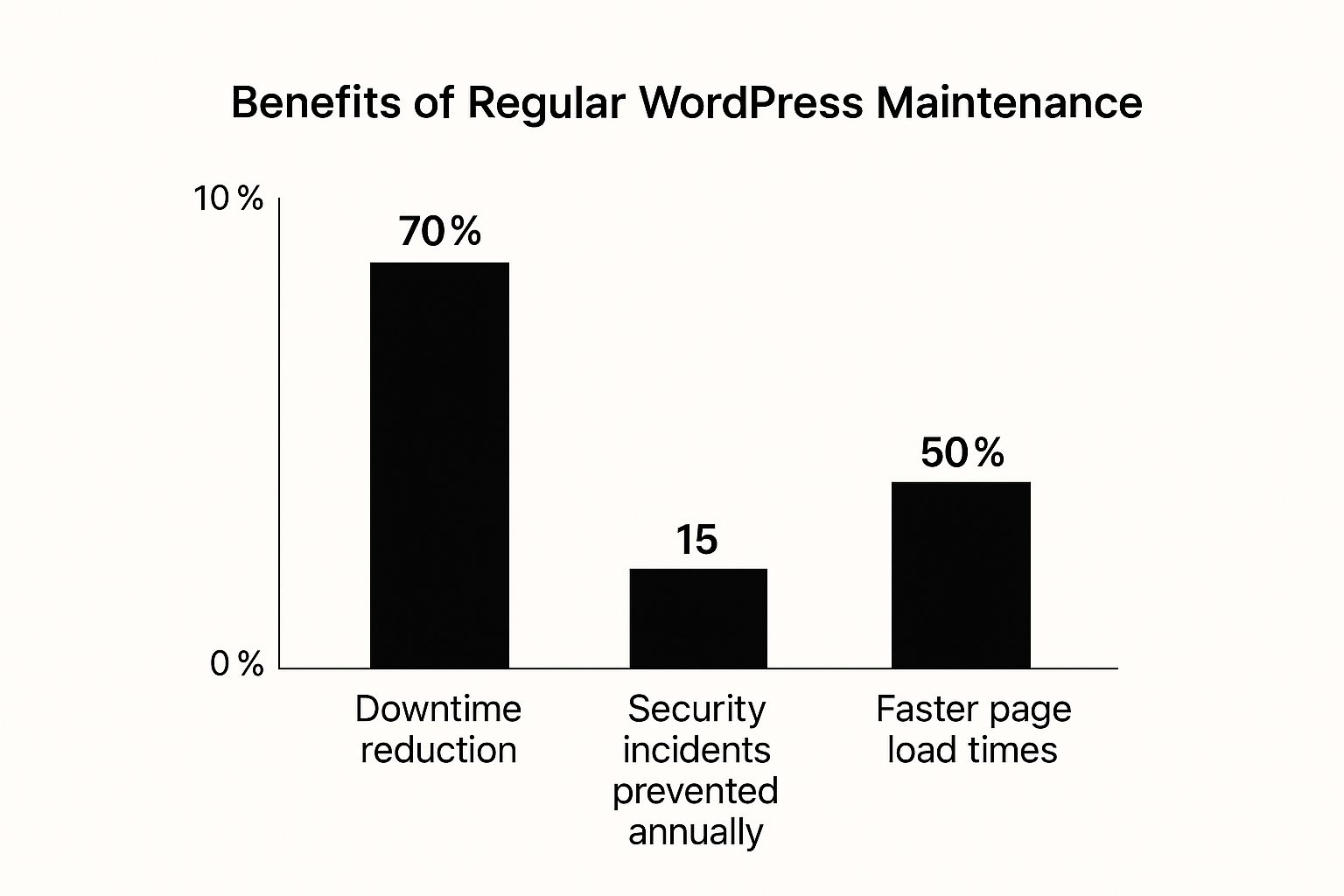
As you can see, the benefits have a real impact on your site's reliability and the experience you give your visitors, which is fundamental to any successful business.
Typical Pricing Tiers You Can Expect
Across the UK, you’ll find that most WordPress maintenance services are bundled into tiered packages. This approach makes it easier to align your budget with your website's needs.
- Basic Plans: Perfect for small businesses, bloggers, and anyone with a straightforward informational website. They cover the absolute essentials: weekly updates, daily backups, and security scanning.
- Mid-Tier Plans: Aimed at growing businesses or e-commerce sites, these plans build on the basics. You'll often get performance optimisation, uptime monitoring, and a set amount of support time each month for small fixes.
- Premium Plans: For complex, high-traffic, or mission-critical websites, these top-tier plans are more like a partnership. Expect advanced security, a dedicated contact, staging environments to test changes safely, and strategic advice.
UK market data shows that a small business site can expect maintenance costs between £50 and £150 per month. E-commerce sites often fall into the £100 to £300 per month bracket. For highly customised platforms, costs can climb from £300 upwards, reflecting the bespoke support required. You can explore more about these industry costs to see how they line up with different business needs.
Think of a maintenance plan not as an expense, but as a predictable cost that protects you from unpredictable—and often far more expensive—emergency repair bills.
A Quick Comparison of Maintenance Plan Features
To give you a clearer picture, here’s a simple comparison of how these tiers often stack up.
Typical WordPress Maintenance Plan Tiers in the UK
This table breaks down the common features you'll find at each level, helping you see where your website might fit.
| Feature | Basic Plan (e.g., Small Business) | Mid-Tier Plan (e.g., E-commerce) | Premium Plan (e.g., Custom/Complex Site) |
|---|---|---|---|
| WordPress Updates | Core, Theme & Plugin Updates | All Basic Features | All Mid-Tier Features |
| Backups | Daily Off-Site Backups | Plus Real-Time Backups | Plus Instant Restore Capability |
| Security | Malware Scanning | Plus Firewall Management | Plus Proactive Threat Hunting |
| Performance | Basic Caching | Plus Speed Optimisation | Plus Database & CDN Optimisation |
| Support | Email Support | Plus Phone & Chat Support | Plus Dedicated Account Manager |
| Reporting | Basic Monthly Report | Detailed Performance Report | Customised Strategic Reporting |
By understanding these structures, you're in a much better position to ask the right questions and find a plan that offers real value for your business.
How to Choose the Right Maintenance Partner
Choosing a provider for your WordPress maintenance plan is like finding a good mechanic for a car you rely on every day. It’s not just about technical skill; it’s about trust, clear communication, and knowing they'll have your back if something goes wrong. Handing over the keys to your website is a big decision, so it pays to do a little homework first.
Your goal is to find a partner who understands your business, not just a service that ticks off a list of tasks. A great provider is proactive, transparent, and genuinely invested in your website's success. To help you sort through the options, let's look at what you should be looking for.
Key Questions to Ask Any Potential Provider
Before you sign anything, a quick chat can tell you almost everything you need to know. Think of it as a short interview to make sure they're the right fit for your site—and your peace of mind.
Here are the essential questions you should always ask:
-
How Do You Test Updates? A true professional will never update plugins or themes directly on your live website. The correct method is to use a staging site—a private clone of your live site—to test everything first. This simple step prevents a faulty update from taking down your customer-facing website.
-
What Are Your Guaranteed Response Times? Don't be afraid to ask for specifics. If your site goes down on a Friday evening, how long will it take them to respond? A good partner will have clear Service Level Agreements (SLAs) that outline their commitment, especially for emergencies.
-
What Do Your Monthly Reports Include? A report shouldn't be a wall of technical jargon. It should clearly explain the work they've done (updates, backups, security scans) and offer useful insights into your site's performance and health. Transparency is key.
-
Is Malware Removal Included? This is a big one. Some basic plans only offer malware scanning, not removal. If your site gets hacked, you could be hit with a large extra bill for the cleanup. A top-tier plan will include a full cleanup and restoration at no extra charge.
Getting straight answers to these questions will help you gauge a provider’s expertise and commitment.
A great maintenance partner does more than just fix problems; they give you the confidence to focus on your business, knowing your digital foundation is secure.
Freelancer vs Agency: Which Is Right for You?
Another big decision is the type of provider to work with. Both freelancers and agencies can offer fantastic service, but they suit different needs. There's no single "best" choice; it comes down to your business's scale and what you're comfortable with.
-
Working with a Freelancer: For small businesses or blogs, this can be a great option. You often get a highly personal service from one person who knows your site inside and out. The main potential downside is availability—if your freelancer is on holiday or unwell, you might have to wait for support.
-
Working with an Agency: If you're a growing business, an e-commerce shop, or have a mission-critical website, an agency usually provides a more robust safety net. You're not relying on one person; you have a whole team. This means someone is always available to handle urgent problems. Agencies also tend to have a wider range of in-house expertise.
To help you decide, think about the role your website plays. If a bit of downtime is a minor headache, a talented freelancer could be perfect. But if every minute your site is offline costs you money, the broader support of an agency is likely the smarter investment. Choosing between the best WordPress maintenance services often comes down to this difference.
The Real Cost of Neglecting Your Website

To understand why WordPress maintenance plans are so important, it helps to ask: what happens if you don't have one? Putting your website's health on the back burner isn't a savvy cost-cutting move. It's a gamble, and the stakes are much higher than a monthly fee. It’s a risk that quietly builds up in the background until it explodes into an expensive, stressful emergency.
Think of it like a tiny leak in your roof. At first, it's nothing—a minor drip you can ignore. But after the next big storm, you’re not just patching a small hole anymore. You're suddenly dealing with serious water damage and a massive repair bill. Proactive care is always, always cheaper than cleaning up after a crisis.
When Inaction Becomes Expensive
Let’s walk through a couple of scenarios I’ve seen play out many times.
Imagine an online shop, ready for its biggest Christmas rush. Suddenly, the site goes dark. The cause? An outdated e-commerce plugin left a backdoor open for hackers. Now, the owners aren’t just scrambling for a high-priced emergency fix; they're losing thousands in sales with every hour the site is offline, and their brand reputation is taking a hit.
Or consider a consultant whose website is their number one source of new leads. After months of neglect, the site has become painfully slow. Potential clients click away in frustration before the homepage even loads. Google, noticing this poor user experience, starts pushing the site down in its search results. The slow drain of new business isn't a dramatic crash—it's a silent killer.
The Hidden Costs You Don't See
The price of neglect goes far beyond obvious repair bills. It can trigger a domino effect of hidden costs that can seriously harm a business.
The fallout nearly always includes:
- Lost Revenue: Every minute your site is down or not working properly is a minute you aren't making sales or capturing leads.
- Damaged Reputation: A hacked or broken website can look unprofessional and suggest you can't be trusted with customer data.
- Plummeting SEO Rankings: Search engines penalise slow, insecure, and error-filled websites, making it harder for new customers to find you.
- Emergency Repair Fees: The cost of fixing a critically broken or hacked site is always much higher than what it would have cost to prevent the problem.
Don't think of a WordPress maintenance plan as just another expense. It's essential business insurance that safeguards your revenue, reputation, and peace of mind.
At the end of the day, proactive maintenance turns a potential nightmare into a predictable, manageable part of running your business.
Your Questions About WordPress Maintenance Answered
It's totally normal to still have a few questions. Choosing the right care plan for your website is a big decision, so let's tackle some of the most common things business owners ask about WordPress maintenance plans.
Can I Just Do the Updates Myself?
In theory, yes, you can click the 'update' button. But that's just a small part of what professional maintenance involves. The real game-changer is having updates tested on a staging site—a private clone of your website—before they go live. This simple step is a lifesaver, as it stops a faulty plugin update from crashing your actual site.
Beyond that, a proper plan is about being proactive. It includes regular security scans, performance tweaks, and the peace of mind that comes from having an expert ready to help.
Doesn't My Hosting Provider Already Handle This?
This is a common point of confusion, but the short answer is almost always no. Think of your hosting provider as your landlord; they're responsible for the building (the server) where your website lives. Their job is to keep that server secure and running.
A maintenance plan, on the other hand, is like a dedicated caretaker for your specific apartment. They look after everything inside your WordPress site—your unique mix of themes, plugins, and content.
How Often Does My Website Need Maintenance?
Good website care is an ongoing process, not a one-time job. Different tasks run on different schedules to keep your site protected.
- Daily: The absolute essentials, like website backups, should happen every single day.
- Weekly: This is for software updates. WordPress core, themes, and plugins should be checked at least once a week to patch security holes as soon as they're found.
- Monthly: This is for deeper health checks, like performance reviews and database optimisation to make sure everything stays running fast.
What Happens if My Site Gets Hacked While on a Plan?
This is a brilliant question, and it’s where you see the quality of a provider shine through. Any maintenance partner worth their salt will have a solid disaster recovery plan ready to go.
Most high-quality WordPress maintenance plans include a full malware cleanup and restoration service as part of the package. This means they’ll find and remove the hack, restore a clean backup, and improve your site’s security to stop it from happening again—all at no extra cost.
Ultimately, choosing a plan is about finding a partner who not only prevents problems but is also fully equipped to fix things if the worst happens. That's true peace of mind.
Ready to ensure your website is always secure, fast, and reliable? Contact us to learn more about our clear, no-fuss WordPress care plans designed to protect your digital investment.